

Published: 15 March 2026 | Last updated: 31 August 2026. eTA Australia supporting documents may include a birth certificate, marriage certificate, name change document, or business letter, uploaded via ImmiAccount when the Department of Home Affairs issues a Request for Further Information. Accepted file formats are PDF, JPEG, and PNG, with a maximum file size of 5 MB per file and a minimum scan resolution of 300 DPI. Non-English documents must include a certified English translation from a NAATI-accredited translator or equivalent authority in the applicant’s country. Each document must be uploaded as a separate file, and colour scans are mandatory for documents containing stamps, seals, or photographs.
What Supporting Documents Are Required for an eTA Australia Application?
A valid passport biodata page is always required; other documents are conditionally requested via ImmiAccount after an RFI. The initial application is submitted through the Australian ETA App, and reference forms include Form 1419 and Form 1554. When the Department of Home Affairs issues an RFI by email, applicants must log into ImmiAccount and respond within 28 days. For current requirements, visit the Department of Home Affairs ETA Subclass 601 page.
| Document Type | When Required | Priority |
|---|---|---|
| Passport biodata page | Always | Mandatory |
| Birth certificate | Minors or name discrepancy | If requested |
| Marriage certificate | Surname changed by marriage | If requested |
| Business letter | Business travel under Subclass 601 | Business only |
Example: a UK citizen applies via the ETA App using only her passport biodata page. Six weeks later she receives an RFI by email, logs into ImmiAccount, and uploads a clear PDF scan of her unabridged birth certificate with a certified English translation.
Birth Certificates for eTA Applications in 2026
An unabridged birth certificate listing both parents is required for minor applicants or if your passport surname differs from your civil records. eTA Australia supporting documents in this category must be scanned as clear, colour copies of originals at 300 DPI, uploaded as PDF, JPEG, or PNG files under 5 MB. Do not submit notarized copies unless explicitly requested in an RFI; a clear scan of the original is sufficient.
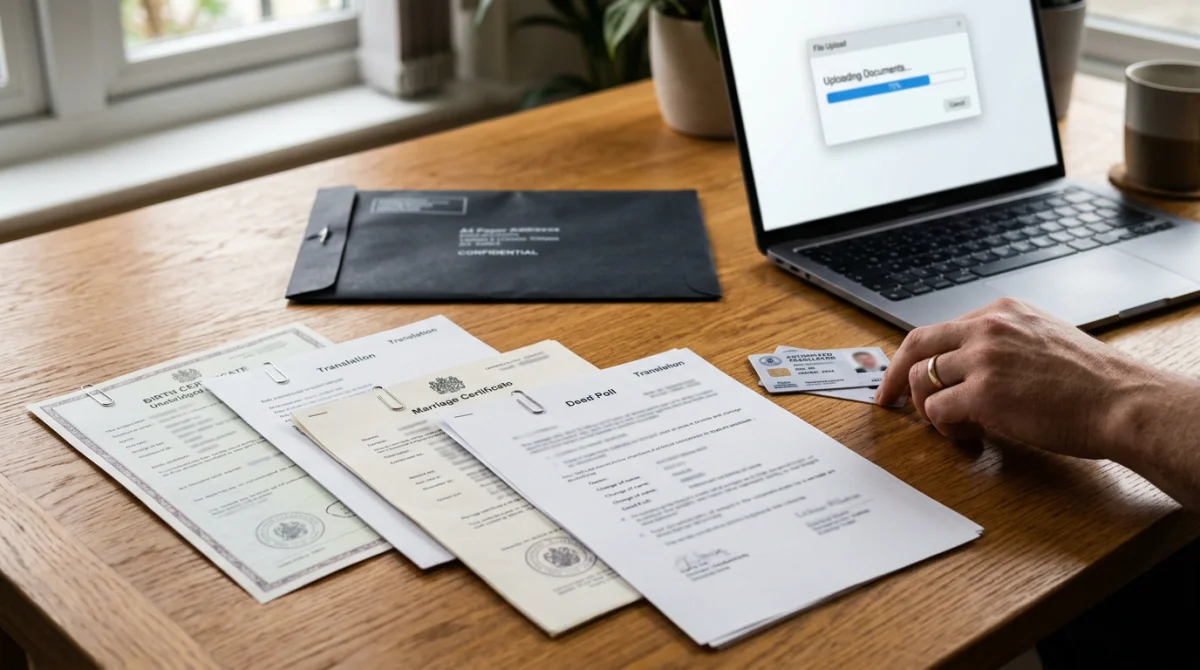
- Attach a birth certificate for every minor applicant, as each child needs their own Electronic Travel Authority (Subclass 601). Minors require an unabridged birth certificate displaying both parents’ names, plus a parental consent letter if only one parent travels.
- Provide eTA Australia supporting documents with certified translations for non-English certificates. Use a NAATI-accredited translator and upload the original and translation as paired files through your ImmiAccount.
- If your passport shows a different surname from your birth certificate, attach the birth certificate plus a linking document (marriage certificate or deed poll).
Traveling with Children: Unabridged Birth Certificates & Parental Consent
Every traveller, including infants, requires a separate eTA Australia. A parent or guardian applies on behalf of a child through ImmiAccount. eTA Australia supporting documents for minors must include an unabridged birth certificate listing both parents. If only one parent travels, attach a parental consent letter; if a child travels with a third party, include custody documents. Refer to Smartraveller for additional guidance on traveling with children.
Marriage Certificates & Name Change Evidence for eTA Applications
Birth certificates are required for minors or name discrepancies; marriage certificates and deed polls prove identity continuity. An eTA Australia marriage certificate or deed poll upload is required when the surname on the passport differs from the name on the birth certificate. The marriage certificate must match the current surname on the passport. Certified translation is required for non-English certificates; upload both the original-language certificate and the translation as a paired set via ImmiAccount.
| Document Type | Country Where Valid | Certified Translation Needed? | Upload Format |
|---|---|---|---|
| Marriage certificate | All countries | Yes, if non-English | PDF/JPEG/PNG |
| Deed poll | UK, Australia, New Zealand | Yes, if non-English | PDF/JPEG/PNG |
| Court order | All jurisdictions | Yes, if non-English | PDF/JPEG/PNG |
| Statutory declaration | Some jurisdictions | Yes, if non-English | PDF/JPEG/PNG |
Deed Poll, Court Order & Statutory Declaration: Which Name Change Document Do You Need?
Accepted eTA Australia supporting documents for name changes include deed poll (common in UK, Australia, New Zealand), change of name certificate, court order, and statutory declaration. Country-specific equivalents include the “Änderungsbescheinigung” in Germany or “acte de changement de nom” in France. All must be scanned as clear, colour copies of originals at 300 DPI and uploaded as separate files under 5 MB.
Business Letters for eTA Australia Applications: What to Include
Business letters must include letterhead, ABN/ACN, applicant’s role, travel dates, purpose, sponsorship, and host contact. The letter, dated within 6 months of your application, must state the ABN or ACN of the Australian host and include a financial sponsorship statement. eTA Australia supporting documents in this category apply to Subclass 601 applicants traveling for meetings, conferences, or negotiations.
- Company letterhead with full name, address, and contact details
- ABN or ACN if the host is Australian; company registration number if overseas
- Signatory’s full name and title
- Applicant’s name, position, and employment duration
- Specific purpose of the visit
- Exact travel dates
- Statement of financial sponsorship
- Australian host contact person (name, phone, email)
Invitation Letter from an Australian Host vs. Employer Support Letter
An employer support letter verifies employment, purpose, and financial backing. An Australian host invitation letter confirms the business relationship and provides local contact details. Submit both eTA Australia supporting documents when traveling for a specific business event.
How to Prepare and Upload Your Documents: File Format, Size & Quality Rules
Upload documents as PDF, JPEG, or PNG under 5 MB, scanned at 300 DPI in colour if stamps or seals are present. Submit initial applications via the ETA App, but upload any eTA Australia supporting documents requested via an RFI through ImmiAccount. Non-English documents require a NAATI-certified English translation uploaded as a separate paired file. Capture full pages without cropping or shadows, and upload each document as a separate file.
| Accepted Formats | Rejected Formats | Common Mistakes |
|---|---|---|
| PDF, JPEG, PNG | HEIC, encrypted PDFs | Combining files, missing translations |
Where to Find the Document Upload Section: ETA App vs. ImmiAccount
Submit initial application via the ETA App
The initial eTA application is submitted through the Australian ETA App, available on iOS and Android.
Receive a Request for Further Information
If the Department of Home Affairs requires additional documents, they will issue an RFI by email.
Log in to ImmiAccount
eTA Australia supporting documents must be uploaded through ImmiAccount, not the ETA App.
Locate the “Attach Documents” section
Navigate to your application within ImmiAccount to find the document upload area.
Upload within 28 days
The typical response deadline is 28 days from the RFI notification.
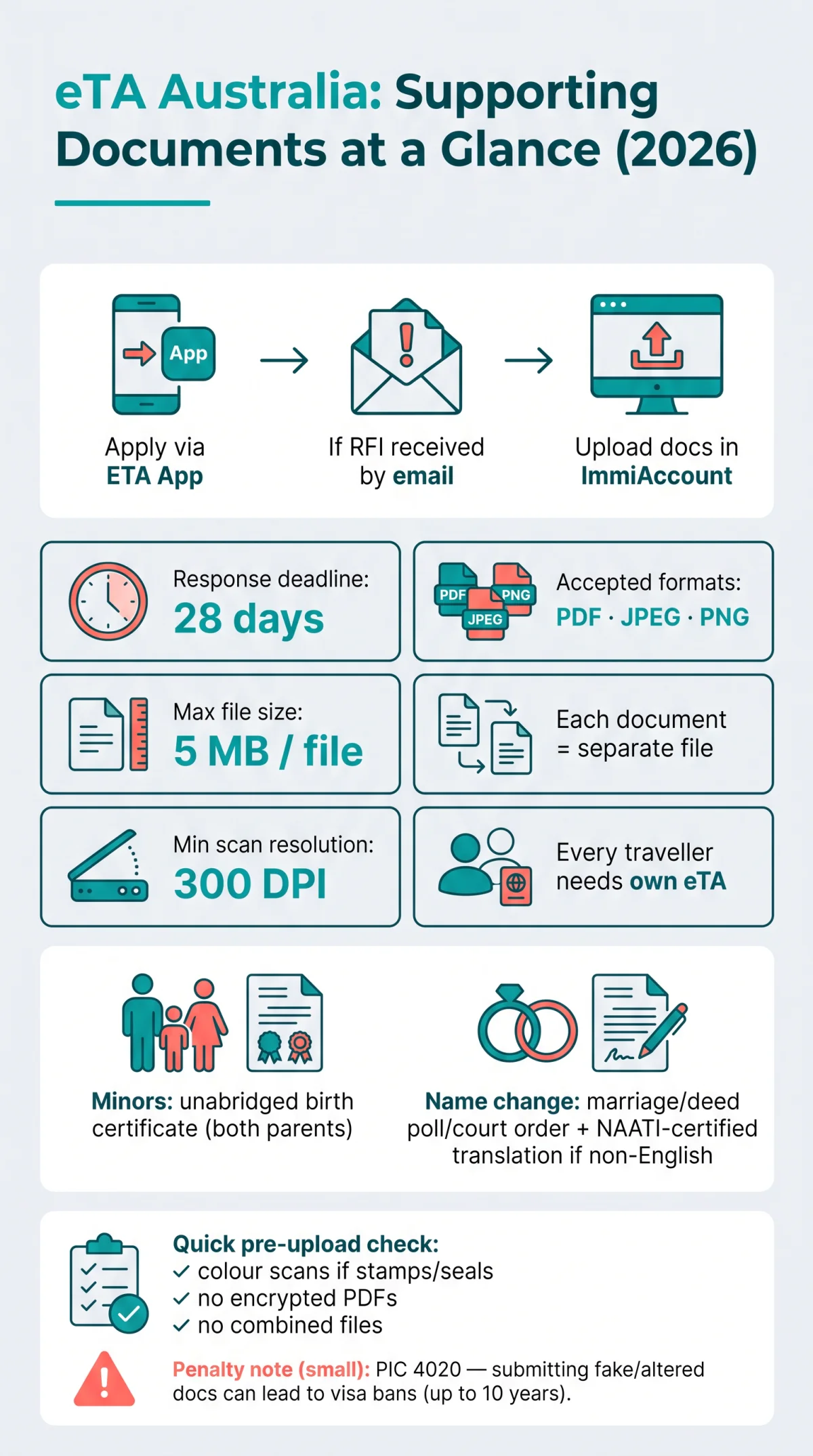
Common Document Upload Mistakes & How to Avoid Rejection in 2026
The most common eTA Australia document upload mistakes are poor scan quality, missing certified translations, encrypted PDFs, and submitting fraudulent documents which trigger a Public Interest Criterion 4020 ban of up to 10 years. Under PIC 4020, submitting bogus or altered eTA Australia supporting documents can result in a ban from all Australian visas for up to 3 years (if deception was not intentional) or up to 10 years (if knowingly fraudulent).
Quick Pre-Upload Self-Check:
- Is each document a separate file?
- Is the file under 5 MB in PDF, JPEG, or PNG format?
- Is the scan full-page with no cropping, shadows, or glare?
- If non-English, is a certified translation attached as a second file?
- Is the PDF free of passwords and encryption?
- Are you uploading to ImmiAccount (not the ETA App) if responding to an RFI?
| Common Mistake | Impact | How to Fix It |
|---|---|---|
| Poor scan quality (shadows, glare, cropped edges) | Document rejected; RFI reissued | Use a flat surface with even lighting; scan at 300 DPI |
| Missing certified translation | Application delayed | Use a NAATI-accredited translator; upload original and translation as a pair |
| Wrong file format (e.g., HEIC from iPhone) | File not accepted by ImmiAccount | Convert to PDF, JPEG, or PNG before uploading |
| Encrypted or password-protected PDF | Upload fails | Remove all encryption and passwords before uploading |
| Combining multiple documents in one file | Processing delay or rejection | Upload each document as a separate file |
FAQ: eTA Australia Supporting Documents, Your Questions Answered
Do I need to upload a birth certificate for an eTA Australia application?
Not always. Required for minors, name discrepancies, or if requested after lodgement. For minors, an unabridged birth certificate listing both parents is required.
Can I upload multiple supporting documents in a single file for eTA Australia?
No. Submit each eTA Australia supporting document as a separate file unless the Department of Home Affairs instructs otherwise in an RFI. Each file must be in PDF, JPEG, or PNG format with a maximum size of 5 MB.
Do I need certified translations for non-English birth or marriage certificates?
Yes. Any document not in English must be accompanied by a certified translation from a NAATI-accredited translator in Australia or an equivalent sworn translator in the applicant’s country. Upload both the original and the certified translation as separate files in a paired set.
What file format and size are accepted for eTA supporting documents?
Accepted formats for eTA Australia supporting documents are PDF (preferred), JPEG/JPG, and PNG. The maximum file size is 5 MB per file. Encrypted or password-protected PDFs are rejected. A minimum scan resolution of 300 DPI is required, with colour scans mandatory for documents containing stamps, seals, or photographs.
Are notarized copies required for eTA Australia supporting documents?
Generally no. A clear scan of the original document is sufficient for eTA Australia supporting documents unless the Department of Home Affairs specifically requests a notarized copy in an RFI. Submit clear, full-page scans with no cropping, shadows, or glare.
What mandatory elements must a business letter for eTA Australia contain?
A business letter must include: company letterhead with full name and address; ABN or ACN if the host is Australian; applicant’s full name, position, and employment duration; specific trip purpose; exact travel dates; financial sponsorship statement; host company contact details; and signatory’s full name and title. The letter should be dated within 6 months of the application.
How do I prove my surname changed after marriage when applying for eTA Australia?
Upload your marriage certificate as a name change document. If issued in a non-English language, attach a certified NAATI translation. The marriage certificate must bridge the name on your birth certificate to the surname on your current passport. If the name changed through a different legal process, upload a deed poll, court order, or statutory declaration instead.
Does every traveller, including babies, need their own eTA?
Yes. Every traveller, regardless of age, requires a separate Electronic Travel Authority (Subclass 601). A parent or guardian applies on behalf of a child through ImmiAccount. A parental consent letter is required if only one parent is traveling.
What happens if I submit a fake or altered document with my eTA application?
Under Public Interest Criterion (PIC) 4020, submitting bogus or altered eTA Australia supporting documents can result in a ban from all Australian visas for up to 3 years if deception was not intentional, or up to 10 years if the fraud was knowingly committed. This applies to birth certificates, marriage certificates, name change documents, and business letters.
Where do I upload supporting documents for eTA Australia: the ETA App or ImmiAccount?
The initial eTA application is submitted through the Australian ETA App. However, if the Department of Home Affairs issues a Request for Further Information, eTA Australia supporting documents must be uploaded through ImmiAccount, not the ETA App. Log in to ImmiAccount, navigate to the application, and locate the Attach Documents section. The typical response deadline is 28 days from the RFI notification.
This website is an independent information portal and is not affiliated with the Australian Department of Home Affairs. Always verify details on the Department of Home Affairs website before applying.