

An eTA Australia status check in 2026 is performed through the Visa Entitlement Verification Online (VEVO) system at immi.homeaffairs.gov.au. Enter your passport number, date of birth, and either your Transaction Reference Number (TRN) or Visa Grant Number to verify whether your eTA (Subclass 601) is pending, approved, or denied. Most eTA applications are approved within minutes; manual review can take up to 72 hours.
Alternative methods: ImmiAccount at online.immi.gov.au or the Australian ETA App on Google Play and the App Store. The Department of Home Affairs issues the eTA as a mandatory travel authorization for eligible passport holders, including citizens of the USA, UK, Canada, Japan, and South Korea. It is not a visa exemption. Last reviewed: 31 August 2026.
What Is an eTA and Why Check Its Status?
An eTA Australia status check confirms whether your Electronic Travel Authority (Subclass 601) has been approved before departure. An eTA is a travel authorization linked to your passport number, issued by the Department of Home Affairs, and required for eligible passport holders entering Australia for tourism or business visits. It is not a visa exemption.
The Department of Home Affairs eTA (Subclass 601) page at immi.homeaffairs.gov.au confirms that a valid visa or travel authority is required for all non-citizen visitors. An eTA Australia status check returns the current visa state, grant date, and attached conditions, verifying that your travel authority is active on your flight date.
How to Check Your eTA Status in VEVO Step by Step
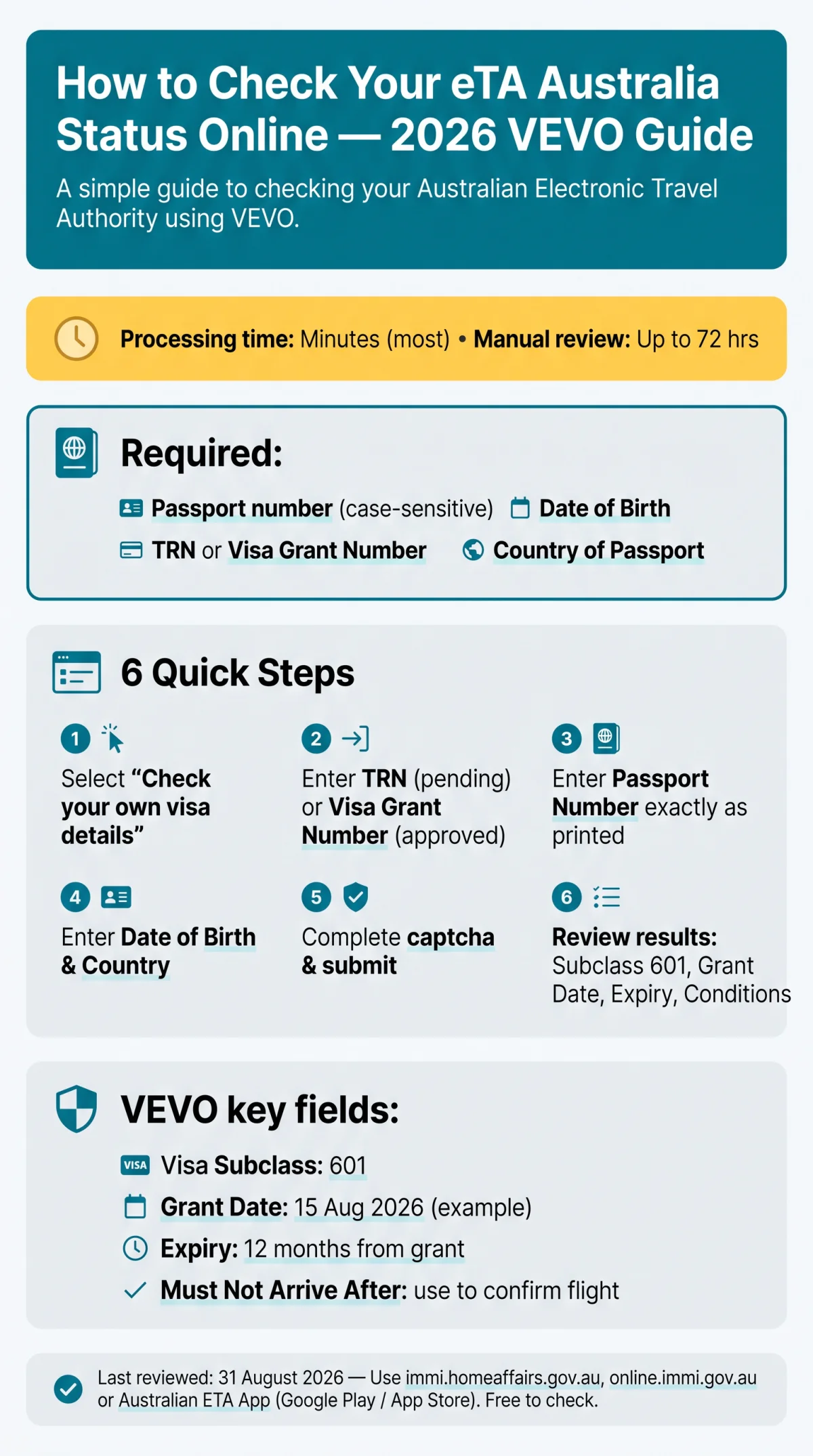
An eTA Australia status check is performed online through VEVO (Visa Entitlement Verification Online) at immi.homeaffairs.gov.au. The system requires your passport number, date of birth, and a reference number.

Select “Check your own visa details”
(or the third-party option if verifying someone else’s eTA with their consent).
Enter your reference number
Enter your Transaction Reference Number (TRN) if your application is still pending, or your Visa Grant Number if already approved.
Input your Passport Number
Input your Passport Number exactly as printed in your travel document.
Enter your Date of Birth and Country of Passport
Enter your Date of Birth and select your Country of Passport from the dropdown.
Complete the captcha challenge and submit the form
Review the results page
A successful eTA Australia status check displays Visa Subclass 601, Expiry Date, entry conditions, and any work or study restrictions.
Practical tip: The passport number field in VEVO is case-sensitive. Enter your passport number exactly as printed in your travel document to avoid a “No application found” error.
Which Reference Number Should You Enter in VEVO?
An eTA Australia status check requires one of three reference numbers. Use your TRN while your application is pending, or your Visa Grant Number after approval. The Visa Evidence Number appears on physical visa labels and does not apply to the eTA.
| Number Type | When You Receive It | When to Use in VEVO |
|---|---|---|
| Transaction Reference Number (TRN) | At application submission | While application is pending |
| Visa Grant Number | Upon approval | After application is approved |
| Visa Evidence Number | On physical visa label | Not applicable to eTA |
Understanding Your VEVO Results – What Each Field Means
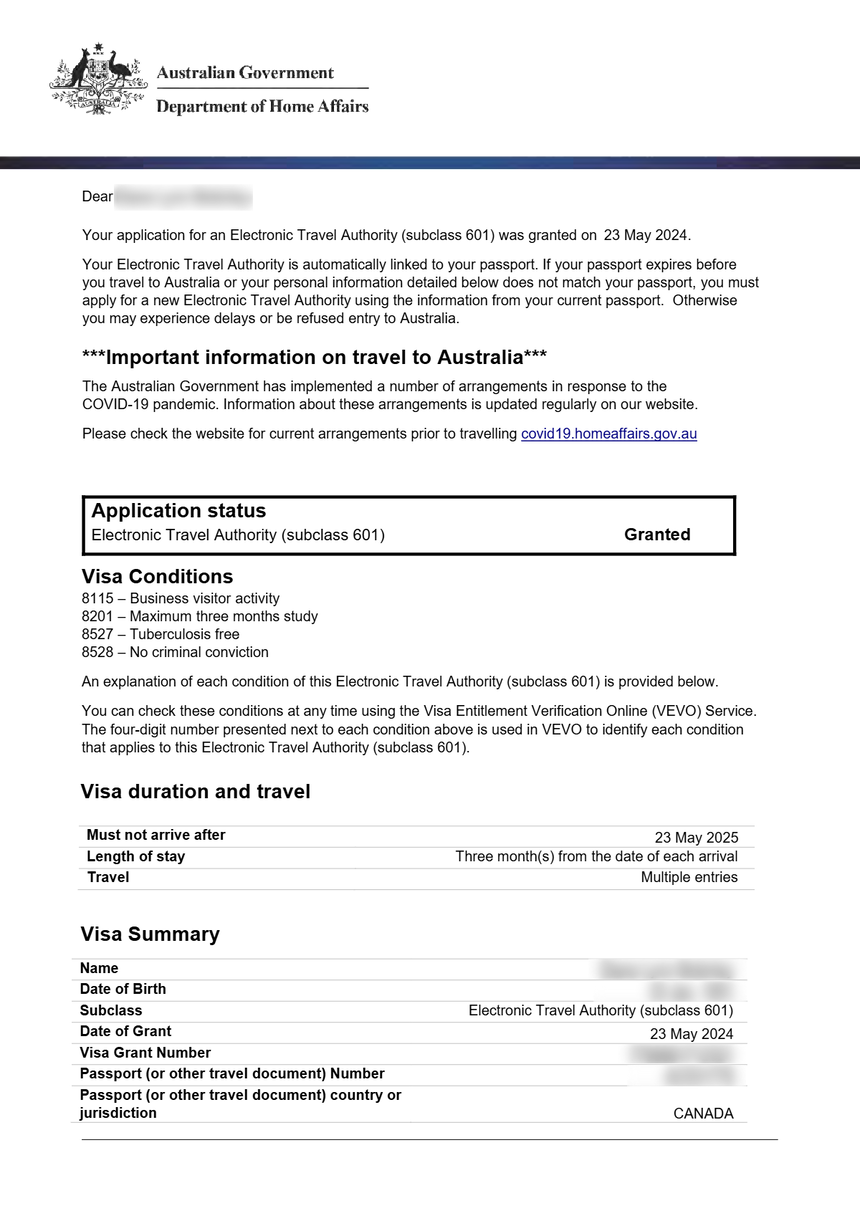
A successful eTA Australia status check in VEVO displays specific visa details. The following table explains each output field for an eTA (Subclass 601):
| VEVO Field | What It Means | Example (eTA Subclass 601) |
|---|---|---|
| Visa Subclass | The visa category | 601 |
| Grant Date | When the eTA was approved | 15 August 2026 |
| Expiry Date | When the eTA expires | 12 months from grant |
| Must Not Arrive After | Last date for entry into Australia | 15 August 2027 |
| Entry Type | Number of entries allowed | Multiple entry |
| Permission to Work | Work authorization status | No |
| Study Conditions | Study limitations | Maximum 3 months |
The eTA Australia status check displays these fields after a successful VEVO lookup. Use the “Must Not Arrive After” date to confirm your travel authority is valid on your planned flight date.
eTA Application Status – What Each Status Means
An eTA Australia status check reveals one of four application states. The Department of Home Affairs sends a Visa Grant Notice email to the address provided in your application upon approval.
| Status | Meaning | Action |
|---|---|---|
| Application received | Application logged. | No action; processed within minutes. |
| Under assessment | Manual review by an officer. | Wait up to 72 hours. |
| Approved | eTA (Subclass 601) granted. | Download Visa Grant Notice; verify via VEVO at immi.homeaffairs.gov.au. |
| Refused | Application denied. | Review refusal reason; consider alternative visa subclass. |
How You’ll Know Your eTA Is Approved – Email and App Notifications
The Visa Grant Notice email is sent to the address you entered during application. Check your spam or junk folder if you do not see it. An eTA Australia status check also shows approval in real time when you log in to your ImmiAccount at online.immi.gov.au or open the Australian ETA App on your phone.
Check Your eTA Status via ImmiAccount and the Australian ETA App
Two additional channels support the eTA Australia status check: ImmiAccount at online.immi.gov.au and the Australian ETA App on Google Play and the App Store.
To perform the eTA Australia status check via ImmiAccount, log in with your registered email, password, and multi-factor authentication through a supported app. The dashboard displays all submitted applications and their current status. If you lose access to your multi-factor authentication app, the portal provides a dedicated account recovery option.
The Australian ETA App offers a faster mobile alternative. After downloading, sign in with biometric verification to view your application history and track progress in real time. The app is designed for personal use only; third-party verification still requires VEVO.
| Method | Best For | Login Required | Third-Party Check? |
|---|---|---|---|
| VEVO | Quick passport-based lookup | No login | Yes (with consent) |
| ImmiAccount | Detailed application tracking | Email + password + MFA | No |
| Australian ETA App | Quick mobile status check | Biometric sign-in | No |
Troubleshooting – eTA Status Not Found, Pending, or Refused
A “No application found” error during your eTA Australia status check usually means an incorrect passport number, an unsubmitted application, or an expired passport link. Verify that the passport number, date of birth, and reference number entered into VEVO match exactly what was used at submission.
In 2026, most eTA applications are approved within minutes. Manual review can take up to 72 hours. If the eTA Australia status check still shows “pending” beyond that window, send a message to the Department of Home Affairs through ImmiAccount at online.immi.gov.au. Processing times and app features are managed by the Department of Home Affairs and may change without notice; this guide reflects the process verified on 31 August 2026.
An eTA is digitally bound to a single passport number. Renewing your passport invalidates any existing eTA, meaning a new application is required before travel.
Checking Someone Else’s eTA – VEVO for Employers and Providers
Employers, airlines, and education providers can perform an eTA Australia status check on behalf of a traveler using VEVO, provided they have the visa holder’s consent, passport number, and either their TRN or date of birth. A separate VEVO portal access is used for third-party checks.
Staying Safe When Checking Your Visa Details
Only immi.homeaffairs.gov.au, online.immi.gov.au, and the Australian ETA App are legitimate; all other sites risk data theft or unnecessary fees. The eTA Australia status check is free on these government domains.
Warning signs of scam sites include requests for full credit card data for “verification,” fake .gov-lookalike domains, and promises of “expedited” eTA processing for a surcharge. The legitimate Australian ETA App is available only through Google Play and the App Store. Any eTA Australia status check performed outside these channels carries security and fraud risk.
Frequently Asked Questions About eTA Australia Status Checks
How long does it take for an Australian eTA to be processed in 2026?
Most eTA applications are approved within minutes. Manual review can take up to 72 hours. Monitor via VEVO at immi.homeaffairs.gov.au, ImmiAccount at online.immi.gov.au, or the Australian ETA App.
Can I check my eTA status without a reference number?
VEVO requires either a Transaction Reference Number (TRN) for pending applications or a Visa Grant Number for approved ones. Without either, use ImmiAccount at online.immi.gov.au instead.
Why can’t I find my eTA in VEVO?
Common causes: wrong passport number, renewed passport not linked, application not lodged, or session timeout. Double-check fields or try ImmiAccount to verify submission.
I renewed my passport. Do I need a new eTA?
Yes. An eTA is digitally bound to one passport number. A renewed passport requires a new eTA application before traveling to Australia.
What is the difference between an eTA, an eVisitor, and a Tourist Visa?
An eTA (Subclass 601) is for eligible passport holders such as USA, UK, Canada, Japan, and South Korea. An eVisitor (Subclass 651) is for EU passport holders. A Tourist Visa (Subclass 600) is for all nationalities with a more detailed application process.
Who is eligible to apply for an Australian eTA?
Eligible passport holders include citizens of the USA, UK, Canada, Japan, South Korea, and others listed on the Department of Home Affairs website at immi.homeaffairs.gov.au.
My eTA was approved but I didn’t receive an email. What do I do?
Check your spam folder, then use the Australian ETA App or ImmiAccount at online.immi.gov.au to view approval status, or confirm via VEVO at immi.homeaffairs.gov.au.
What does “Further assessment required” mean for my eTA?
Your application has been flagged for manual review by the Department of Home Affairs. No action is needed; most cases resolve within 72 hours. Monitor via VEVO or ImmiAccount.
Can an airline or employer check my eTA status before I travel?
Yes. Employers, airlines, and education providers can use VEVO with the visa holder’s consent, passport number, and either TRN or date of birth. A separate VEVO portal access is used for third-party checks.
Is there a fee to check my eTA Australia status online?
No. The eTA Australia status check via VEVO, ImmiAccount, and the Australian ETA App is free. Avoid third-party sites charging fees; use only immi.homeaffairs.gov.au, online.immi.gov.au, or the Australian ETA App from Google Play or the App Store.
Editorial note: This guide was last reviewed on 31 August 2026 by our editorial team with practical experience using VEVO, ImmiAccount, and the Australian ETA App for eTA verification. This article is published by an independent tourist information portal and is not affiliated with, or endorsed by, the Australian Government or the Department of Home Affairs. The authoritative source for eTA and VEVO information is immi.homeaffairs.gov.au.