

Applying for an eTA Australia application in 2026 requires the AustralianETA app on an NFC-enabled iOS or Android device. You must scan your ePassport, take a biometric photo, fill in your details, and pay the AUD 20 service fee for near-instant approval. Use this guide to complete your application accurately and avoid delays or manual assessment referrals by Home Affairs.
Last updated: August 2026. We review this guide every 3 months to reflect any changes in the eTA Australia application process.
What Is the Australian eTA and Who Needs One?
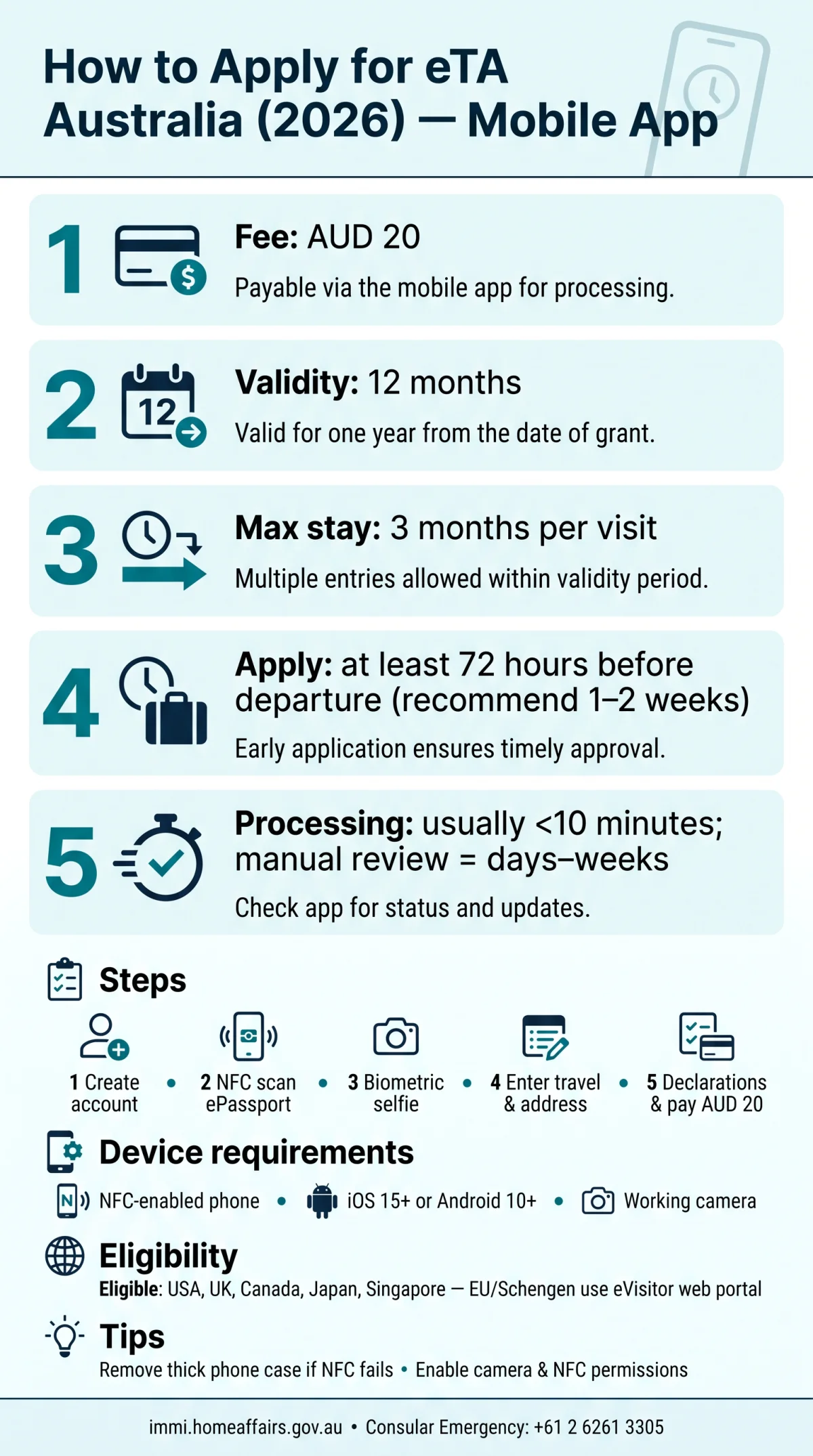
The Australian eTA is a digital visa waiver linked to your passport, valid for 12 months, allowing multiple entries with each stay up to 3 months for tourism or business visitor purposes.
Unlike a traditional visa, the eTA Australia application requires no embassy visit, no paper forms, and no in-person appointment. The Department of Home Affairs, the Australian government body overseeing immigration, governs the entire process.
The app is the only way to lodge an eTA Australia application. Once approved, the eTA is linked to the passport electronically.
eTA Eligibility – Who Can Apply via the Mobile App?
The eTA Australia application is available to citizens of eligible countries like the USA, UK, Canada, Japan, and Singapore who hold a biometric ePassport for short-term tourism or business visitor purposes. Meeting strict criteria is required before downloading.
- Eligible passport holders: Citizens of the USA, UK, Canada, Japan, and Singapore can submit the eTA Australia application.
- Biometric ePassport requirement: You must possess a valid passport with an embedded electronic chip for NFC scanning.
- Location restriction: You must be physically outside Australia when starting the submission.
- Travel purpose: Permitted strictly for short-term stay (tourism) or business visitor activities.
Citizens of European Union or Schengen Area countries cannot use this app. They must apply for the eVisitor visa online through a web browser instead of completing a mobile submission.
If you hold a diplomatic or official passport, or if you have a criminal record requiring a full visa application, do not use the eTA app. Apply for a Visitor visa (subclass 600) through the Department of Home Affairs website at immi.homeaffairs.gov.au instead.
Device Requirements: NFC, Camera, and Compatibility
Your smartphone must support NFC and have a working camera to complete the eTA Australia application. The AustralianETA app requires an NFC-enabled smartphone running iOS 15+ or Android 10+ to scan the ePassport chip and a camera for biometric verification.
NFC scanning reads the biometric chip inside your ePassport. Check NFC in settings. A functional camera is mandatory for the biometric liveness check, which matches your live selfie against your passport photo. A stable internet connection is required to transmit this data to the Department of Home Affairs.
Without NFC hardware, your phone cannot read the passport chip, meaning the eTA Australia application cannot be completed. Travelers with unsupported devices must borrow a compatible phone or contact an Australian diplomatic mission.
In practice, a thick phone case can block the NFC signal during the eTA Australia application. Removing the case and placing the passport directly against the back of the device resolves most detection failures immediately.
How to Download the AustralianETA App
Download the AustralianETA app by the Department of Home Affairs from the Apple App Store or Google Play to start your eTA Australia application. The only authorized way to submit an eTA Australia application for eligible tourists is through this app.
Beware of third-party websites that charge $50 or more for eTA assistance. Only the AustralianETA app charges AUD 20. If a site asks for your passport scan before payment, it is likely fraudulent.
Open App Store or Google Play
Open the App Store on an iOS device or Google Play on an Android smartphone
Search for AustralianETA
Search for the AustralianETA app
Verify the publisher
Verify the listed publisher is the Department of Home Affairs to avoid third-party lookalikes
Install the app
Tap install or get – the app requires camera and NFC permissions to scan your ePassport chip and take a biometric photo
Step-by-Step: Account Setup, NFC Passport Scan & Biometric Photo
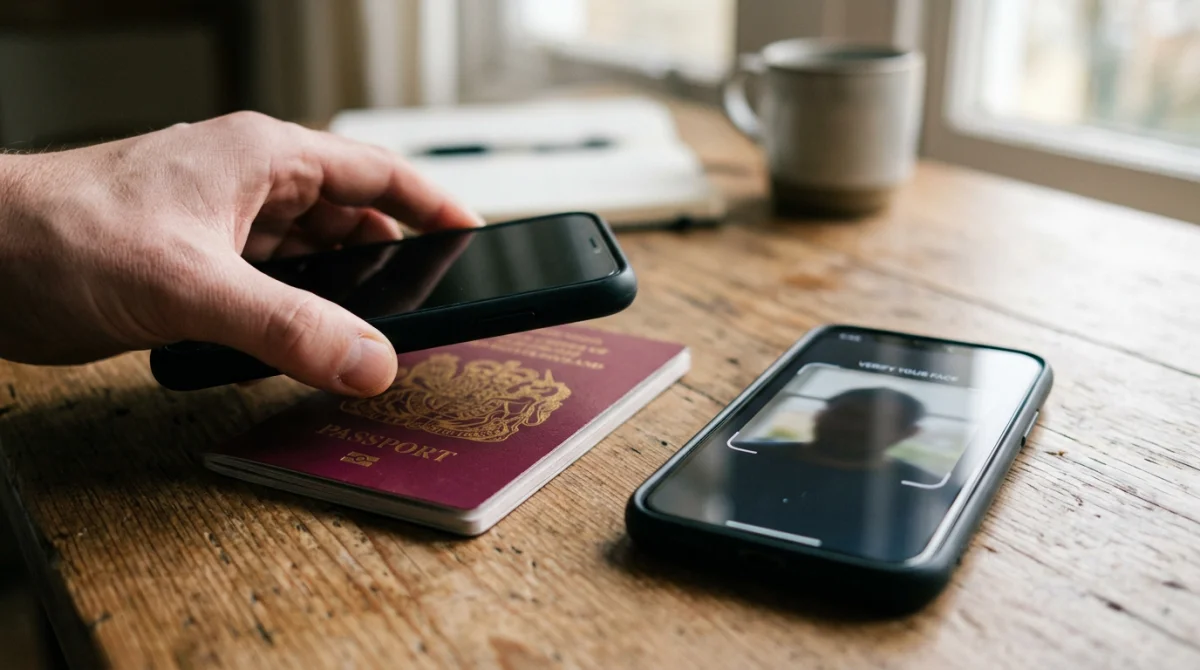
Open the AustralianETA app and tap “Apply”. Create an account, scan your ePassport chip via NFC, then take a biometric selfie to begin your eTA Australia application.
-
Step 1 – Create an Account or Log In
Open the AustralianETA app and tap “Apply”. Create a new profile using your email address and a secure password, or log in if returning.
-
Step 2 – Scan Your ePassport Chip (NFC)
Place your phone flat on the back cover of your ePassport. NFC reads the chip and pre-fills your name, DOB, and passport number. If the passport is not detected, move the phone slowly across the back cover or remove your phone case.
-
Step 3 – Take Your Photo (Facial Biometric)
Hold your phone at face level for the biometric liveness check. Use good lighting, remove sunglasses, and keep a neutral expression. The app matches this live photo to your passport data to advance your eTA Australia application.
Step-by-Step: Entering Personal, Travel & Address Details
After scanning your passport and taking a biometric photo, the next stage of the eTA Australia application requires confirming auto-filled details and entering your travel plans and Australian address.
Step 4: Enter Personal Details
After the ePassport scan pre-fills your name, date of birth, and passport number, confirm each field for accuracy. Manually enter your nationality, country of birth, and occupation. Any mismatch between the scanned data and your typed input can trigger a manual review and delay the decision.
Step 5: Enter Travel Information
Provide your intended date of arrival in Australia. Select the purpose of your short-term stay: tourism or business visitor activities. The eTA Australia application does not support long-stay purposes such as study or work, so choose the category that matches your actual travel plans.
Step 6: Provide Australian Address & Contact Details
- Enter your accommodation address in Australia: hotel, hostel, or a friend’s residence.
- If you have not booked accommodation yet, enter TBA in the address field.
- Add a local contact phone number if available.
- Provide a valid email address for status notifications and decision alerts.
Step-by-Step: Declarations, Group Submission, Review & Payment
Answer character declarations, add family members, review your data, then pay the AUD 20 service fee to complete your eTA Australia application.
-
Step 7: Character & Criminal History Declarations
The eTA Australia application requires you to answer a series of yes/no questions about criminal convictions, immigration violations, and health conditions. Answering “Yes” to any question routes your request to manual assessment by Home Affairs, which can take days to weeks. False declarations lead to automatic refusal and a potential ban from future applications.
-
Step 8: Add Multiple Applicants (Family/Group)
You can add family members or travel companions from the same device. Each additional applicant requires their own passport scan and biometric photo before proceeding.
-
Step 9: Review and Confirm Your Application
Review the summary screen (passport, personal info, travel, address, declarations). Edit if needed, then tick the consent checkbox.
-
Step 10: Pay the Application Fee and Submit
The eTA Australia application charges a AUD 20 service fee with no separate visa application charge. Pay via credit card, debit card (Visa, Mastercard), Apple Pay, or Google Pay. Upon submission, the app displays a reference number for tracking your decision.
Processing Time – How Long Does eTA Approval Take?
Most eTA Australia application decisions are approved within minutes through automated checks by Home Affairs, but referrals for manual assessment can take days to weeks.
The system uses automated screening that verifies passport data, eligibility, and character declarations against government databases. When all answers match expected criteria, the system delivers instant approval, typically in under 10 minutes. The eTA is then linked automatically to the applicant’s passport.
Certain factors trigger manual review by Home Affairs: answering “Yes” to any criminal history or character declaration question, an identity mismatch between the biometric selfie and the ePassport chip photo, or system backlog. A human officer then reviews the eTA Australia application file, extending the decision timeframe to several days or longer.
Submit your request at least 72 hours before departure; applying 1 to 2 weeks ahead provides a safer margin for any unexpected referral.
After You Apply: Tracking Status and Troubleshooting
The AustralianETA app provides real-time status updates for your eTA Australia application through four stages: Submitted, Under Assessment, Approved, and Refused. Email notifications are sent to the registered address, and push notifications alert the user if enabled. Each decision references the application ID number assigned at submission.
Technical issues can delay or block your eTA Australia application. For NFC passport detection failures, ensure NFC is enabled in Settings, remove phone cases, and place the passport flat against the back of the device. For camera permission errors, grant camera access in the app permissions settings.
If your device cannot complete the process, borrow an NFC-compatible smartphone or contact the nearest Australian diplomatic mission. The Consular Emergency Centre (Australia) is reachable at +61 2 6261 3305, available 24 hours a day, 7 days a week. Additional guidance is available at the external government portal immi.homeaffairs.gov.au.
eTA vs. eVisitor: Which One Do You Need?
Citizens of the USA, UK, Canada, and Japan complete an eTA Australia application via the AustralianETA mobile app, while EU and Schengen passport holders apply for an eVisitor through an online web portal instead. For a full breakdown of the differences, see our eTA Australia vs eVisitor comparison.
| Feature | eTA | eVisitor |
|---|---|---|
| Eligible passport holders | USA, UK, Canada, Japan, Singapore, and other eligible countries | EU and Schengen Area citizens |
| Application method | AustralianETA mobile app (iOS and Android) | Online web portal |
| Validity | 12 months, multiple entries | 12 months, multiple entries |
| Maximum stay per visit | 3 months | 3 months |
| Purpose | Tourism and business visitor | Tourism and business visitor |
The eTA Australia application is app-only with no web-based alternative for eligible passport holders. If your passport does not qualify for the eTA, submit the eVisitor request through the Department of Home Affairs website at immi.homeaffairs.gov.au.
Frequently Asked Questions (FAQ)
When should I apply for my eTA before traveling to Australia?
Apply at least 72 hours before departure, but 1 to 2 weeks in advance is recommended to allow for any manual assessment by Home Affairs.
Do I need an eTA if I’m from the UK?
Yes, citizens of the United Kingdom need an eTA for short-term stays in Australia for tourism or business visitor purposes. UK passport holders must use the AustralianETA mobile app to submit their eTA Australia application, provided they hold a biometric ePassport.
Can I apply for an eTA without the mobile app?
No, the AustralianETA app is currently the only authorized way to lodge an application. If your device is incompatible, you must borrow an NFC-enabled smartphone or contact the nearest Australian embassy or consulate for assistance.
How much does the eTA Australia application cost?
The eTA Australia application costs AUD 20 (service fee, no visa application charge). Pay via credit card, debit card, Apple Pay, or Google Pay within the app.
What happens if my eTA application is refused?
If your eTA Australia application is refused, you will receive a notification explaining the reasons. A refusal often results from identity mismatches or false declarations. You may need to apply for a traditional visa or contact the Department of Home Affairs to discuss your travel options.
Does the eTA app require a biometric scan?
Yes, the app requires a live facial biometric liveness check. You must take a photo of yourself following on-screen prompts like blinking or turning your head. The app compares this selfie against the image stored on your ePassport chip to verify your identity.
Is the AustralianETA app safe to use with my passport data?
Yes, the AustralianETA app is published by the Department of Home Affairs and is safe to use. Download the app only from the Apple App Store or Google Play to avoid third-party lookalikes that may compromise your personal data.
Can I use the same eTA for multiple trips to Australia?
Yes, an approved eTA Australia application grants multiple entries. The eTA is valid for 12 months from the date of approval, and you can stay in Australia for up to 3 months per visit for tourism or business purposes.